Sunday, August 12, 2007

Create a custom button bar in Internet Explorer

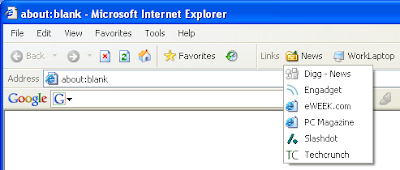
If you are accessing certain sites frequently, then it’s a good idea to create a custom button bar and assign a button to each site you visit. Those sites on the toolbar are now one click away!

Click to zoom

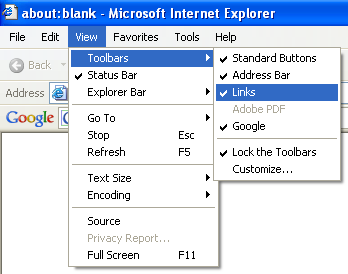
Step 1. Enable Links Toolbar in View menu


Step 2. Next time, when you visit an interesting site, just drag and drop the icon in the browser address bar to your custom button bar.

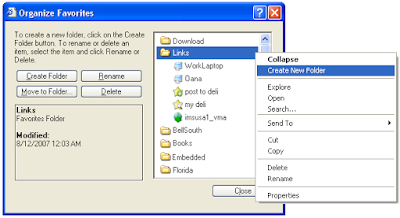
Step 3. Create menus. If you don’t have space anymore on the toolbar, then you can group several buttons using a menu. Menus are actually subfolders of Links folder. You can create them easily using Organize Favorites command.


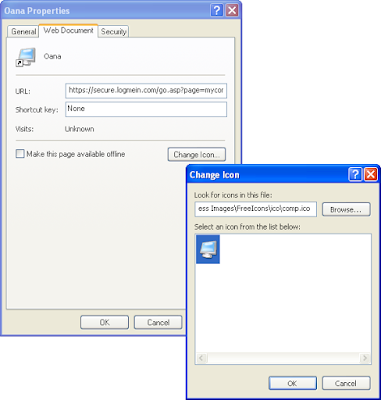
Step 4. Customize icons. This step is optional but contributes to the aesthetics of your button bar. Not to mention that some people recognize faster a shape than a text.


Note that some websites, such as del.icio.us, make use of this toolbar to implement custom tools.

Saturday, August 11, 2007

Web based tools for downloading and converting YouTube Videos

There are dozens of online and offline tools for downloading and converting YouTube videos. If you are in a hurry, just use any of the following three web based tools:


http://keepvid.com/
http://www.videodl.org/
http://www.zamzar.com/

Zamzar has the ability to download and convert, in the same time, a YouTube video to a common format, such as .avi.

Enhance Google search with Snap Shots

The snap shots add-on tool from snap.com is quite known by web developers and bloggers, who used it to offer quick preview of external links.

They recently extended their offer with a new version of their tool dedicated to end-users. After downloading the Snap Shots Add-On onto your browser, all major sites and portals will be enhanced with snap shots capabilities (Google is just one of them).

Here is an image of a Google search, enhanced by Snap Shots Add-On. Now you can have in Google what Ask.com (binocular preview) had already for quite of time.

Click to zoom

If you like what you see in the above image, just go and download the free add-on.

Friday, August 10, 2007

Convert your Word documents to PDF using free online tools

There are situations when you want to convert a Word document (or other common document formats) to PDF without installing software on the local machine. You can do this very easily with the excelent free tool from pdfonline.com


To give a quick try to this service, pick a document from your local drive and enter an email address where you want to receive the converted PDF:
Document:
Email:
* Email subscribers – the form is available only in online version.

Scan your computer for free with an online antivirus

Don’t waste your system resources and money by purchasing and installing a local antivirus. It’s a known fact that the realtime protection of a local antivirus it’s a considerable overhead even for modern processors. Due to this fact powerusers prefer to use their antivirus only for occasional scans of downloaded files.

If you are one of those users who can live without a realtime protection then you should consider an online antivirus. By installing latest security packs and using common sense and extra care when navigating on the web almost everybody will find an online antivirus sufficient.

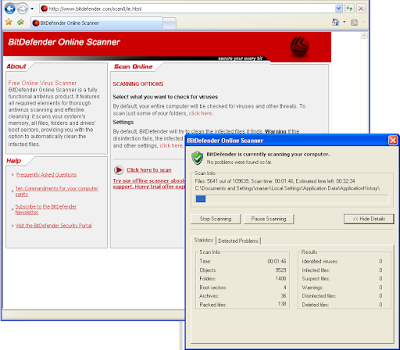
A very good online antivirus is BitDefender Online Scanner

Click to visit antivirus site

Protect your network connection

Windows XP comes with a firewall built in. Check your machine now and see if this is enabled and if not take a 5 minutes brake and read the rest of this article.

Windows Firewall

Click to zoom

The Windows Firewall protects your network/internet connection for unwanted inbound connections such as ill intended people or automatic scanners that tries to connect/use your services.

Most home users have also firewall (or some sort of NAT protection) at the router level so they decide to turn off the built in Windows firewall. This is now a good idea because if one of the other home computers gets infected, the not-protected computers may also get infected – (the threat comes from inside your network and thus is not filtered by your internet router). Not to mention that you’re totally exposed when you travel with a not-protected laptop.

3rd party Firewalls

While Windows Firewall proves to be efficient in protecting against unwanted inbound connections, it has very limited capabilities in protecting against unwanted outbound connections. There are cases when you want to prevent a program to connect to internet. To monitor outbound connections you have to install a more powerful 3rd party firewall.

A firewall with such capabilities will let you decide which connections should be allowed. For instance you want to block an auto updating software for reaching the internet or you want to know when an unknown executable tries to establish a connection with a remote site.

Since these 3rd party firewalls protect both inbound and outbound connections they usually require to disable the built-in Windows firewall.

There are plenty of 3rd party firewalls available. While the most known ones are commercial software, it is surprising to see that the best ones are free. Recent reviews, made by professional publications such as PC Magazine, PC World and others, recommend the free Comodo Firewall Pro software before other commercial solutions.

Click to zoom

Feel free to use the comments form to ask any question you may have regarding this subject.

Thursday, August 09, 2007

Tame startup programs using free tools

Any of these three tools can be used for determining what programs automatically launch at startup. All of them are available for free.

Why control startup programs:

  • to decrepify a new computer
  • to make your computer run much more faster
  • to disable spyware and other monitoring application.

Windows’ own Msconfig

This is the most used application due to the fact that comes with Windows. Just type into run dialog msconfig and the application will be started:


Startup Control Panel

Startup Control Panel is a nice tool, simple to use and very small, that can be run standalone or as a control panel applet. It allows you to easily configure which programs run when your computer starts.


AutoRuns

AutoRuns has the most comprehensive knowledge of all auto-starting locations of any application or Windows component. Besides the regular Run, RunOnce and other common registry keys, this tools shows also other locations such as browser-helper-objects, Explorer extensions, toolbards, etc.

Monday, August 06, 2007

How to send big files by email

The email attachment is simply not good enough when comes to send big files by email. The most common solutions to this issue are:

  • use a private P2P application to transfer the files;
  • upload the files ahead of time on a private FTP or HTTP server and put just the link in the email. Owning an FTP server is a big hassle for home users due to the IP infrastructure and firewall configuration issues.
  • use a specialized service to send big email attachments.

Specialized services for sending big files

All of the following services can be used without registration. Just select the files you want to send and specify sender's address.

http://beta.localhostr.com/
http://www.yousendit.com/
http://www.mailbigfile.com/
http://www.transferbigfiles.com/


The bad part is that the recipient has to go to a page full of advertisements in order to retrieve his files. Only localhostr gives you the direct download link but the service is limited to 50MB / file.

Sunday, August 05, 2007

How to send photos by email

Even with today’s online photo hosting services most people still prefer to send photos by email. If you owning a recent digital camera most probably each of your JPEG photos will take between 2 to 5 MB. It’s easy to see that only a couple of these hi-resolution photos may be big enough to flood and block recipient’s mailbox.

This post will assume that you are using Windows XP with a local email client (Outlook Express).

How to not send photos

Click to zoom

Actually the above method is OK only if you want to send your friends the original hi-resolution version of the photos, or if you are sending already resized photos.

How to easily email hi-resolution photos

Highlight the photos you want to send in Windows Explorer

Click to zoom

Select Send To -> Mail Recipient and choose to resize photos

Click to zoom

Your friends will not get the original version of the photos, but a scaled down version. This is OK in most situations. If one wants to print photos then you can always send the hi-resolution version at a later time.

How to crop pictures before print

Most people don’t realize that their digital camera takes picture at 4:3 aspect ratio, while the regular 4x6 photo print has a 3:2 aspect ratio. The aspect ratio of an image/photo is its width divided by its height.

Take a look at the properties of one of your digital pictures find out the width and height in pixels for that image.


In the above example, the image is in 2560 x 1920 resolution, which means 2560 / 1920 = 4 / 3. So the photo has a 4:3 aspect ratio.

A regular 4x6 print is a photo with width 6 in and height 4 in, which means 6 / 4 = 3 / 2. So the print has a 3:2 aspect ratio.

If you’ll gone print an image with 4:3 aspect ratio on a piece of paper with 3:2 aspect ratio, and you don’t want to distort the image, you’ll either end up cropping some regions out of the image or adding extra blank space on each side of the image.

Most online photo printing services does the cropping job automatically for you. But since that’s an automated process they usually cut equal amount of data from both sides. In most cases this is fine, and goes unnoticed in the end product, but in some situations this automatic crop is not acceptable. Imagine cutting a person head when actually it’s better to cut from the other end of the picture.

Cropping lots of pictures, one by one in a classic photo editor is a tedious job. JPEGCrops is a nice free tool that helps to lossless crop large number of photos in a visual and quick way. The tool does lossless cropping by manipulating the image data stream directly, rather than render it first and then recode it back to JPEG.


Lossless cropping may seem insignificant at first, but if you’ll gone pass the same image through different processors then it actually makes very sense. After you finished cropping take a look at this post that shows you how to put date/time on each picture just before sending them to print.

Saturday, August 04, 2007

How to print the date and time on your digital pictures

Most digital cameras can be configured to print the date/time the photo was taken directly on the image. While this was a nice feature on a film camera, it’s actually a bad feature with modern digital cameras. The reason: digital cameras put anyway the date and time plus other information in each digital image metadata (EXIF).

In this way you don’t have ruin precious captures with inappropriate text – you can put the date on the photo just before print using the EXIF information.


Putting the date on big number of photos may be a tedious job if you are using a classic photo editor. Read forward to see how you can automate this job using a small tool.

Step 1. Download EyeBatch software.

Step 2. Select your pictures

Click to zoom

Step 3. From available commands list select Text Watermark and adjust various parameters according to your taste

Click to zoom

Step 4. Select also Save to File command and make sure you specify where to place the output files

Click to zoom

Step 5. Click Process button and wait.

Click to zoom

Friday, August 03, 2007

Create a digital bookshelf

If you have lots of books in your bookshelf, you’ll certainly like the idea of cataloging them. A digital catalog has several advantages such as quick search and easy sharing with friends.

You can create a nice catalog out of your books using the following free tool. Just feed the tool with a list of ISBNs and the software does the rest by downloading books metadata, cover images and reviews from Amazon.com.

The output of this software is nice HTML catalog (not in a proprietary format like other software do) which can easily be converted to a single PDF file.


Click here to learn how to download this software.

Low-budget tech support

If you want to offer tech support to your friends or even a customer you can use the free CrossLoop tool. The tool offers a very convenient way to view the screen of a remote computer. You don’t have to do any changes to your network configuration or firewall prior to running this tool. Just follow the following easy steps:

Common scenario:

1. Your friend has a problem with his computer and decides to call you.

2. You instruct him to download and install CrossLoop

Download CrossLoop

3. After installation, tell him to start CrossLoop and switch to Host tab


4. Ask for the displayed access code and then tell him to press Connect button.

5. You type the received code in the textbox on the first tab and click also Connect.


6. In a few seconds you should be able to see and control his screen.

Remarks:

Wednesday, August 01, 2007

Cross-platform multitasking

... or how to use a single keyboard and mouse between multiple computers with different operating systems, each with its own display, without special hardware.


* Synergy demo (viewable only in online post)

Synergy
http://synergy2.sourceforge.net
Notes: Free

Win2VNC
http://win2vnc.sourceforge.net
Notes: Free

KaVoom! KM
http://www.kavoom.biz/km/km_overview.html

Stardock Multiplicity
http://www.stardock.com/products/multiplicity/

VMWare 6 (multiple monitor support)
http://www.vmware.com/products/ws/
Notes: Use a single physical machine with 2 monitors. Maximize a VM on the second monitor to achieve the same effect.

Top 10 home automation projects

1. Garage lights

It is very convenient to switch the garage lights on and off from both your home and the garage itself. You’ll have to run a 3 wire cable between the two buildings and put some two-way switches at both ends. You can use an X10 lamp module in your garage and 2 X10 switches: one in the garage and one inside the house.

2. Outdoor Christmas lights

Most people prefer to put all outdoor lights in one single outlet for convenient switching. While this is fine with modest installation and small homes, it may become a problem with bigger homes due to cord management issues. You can ease your life by using a couple of X10 appliance modules set on the same house and unit code. With a single button click on any X10 controller you can turn the lights on and off very easily.

3. Christmas tree lights

Year after year I had to crawl under Christmas tree at least twice a day to plug or unplug the lights. This will change this year because I’m planning to plug the lights in an X10 lamp module. With this module in place I can very easily program my X10 mini-timer to switch on the Christmas tree lights at dusk and turn them off at down. Since the tree will be in the living room I’m also planning to play with the dimmer during movie time.

4. All lights on

X10 offers the ability (out of the box) to turn on all lights in a home. A more interesting application is to turn on all lights in a single room. My living and dining room are actually one big room. I always wanted to switch on and off the lights in the living room and dinging room simultaneous without rewiring. Using couple of X10 modules set on the same house and unit code I was able to switch, at the same time, the lights from both rooms.

5. Convenience switching

I don’t know exactly for what reason (maybe to save money) some constructors choose to use pull-chain type switches with the lights from attics or basements. To get light in any of these rooms you have to go in the middle of the room, in complete darkness looking for the switch. With X10 lamp modules or screw-in modules you can control these lights from basically anywhere.

6. Security lights

Using a wireless motion sensor detector, an X10 transceiver and a couple of floodlights you can build a classic security system. Each time the sensor detects motion the lights will turn on.

7. Watering the lawn

If you don’t like spending time adjusting your sprinkler’s timer, then let X10 control the watering for you. As a controller you can use an X10 mini-timer or even your PC computer with an adequate interface.

8. Opening and closing the window shades

Using X10 you can implement a basic system that will gradually open your bedroom shades in the morning according to your schedule (eg. each day at 8:00AM, Saturdays and Sundays at 10:00AM).

9. Have fresh toast in the morning

In the past they used to use X10 to automate the coffee machine. With modern coffee machines, X10 is not longer needed. It was replaced by the machine internal timer. Since the common toaster was not that affected by the technology progress, why not enhance it’s capabilities by plug-in it in an X10 appliance, and have fresh toast at 8:20AM?

10. Automate your home from the Internet

Geeks may find interesting to control the entire house from the web. Turning on and off lights and appliances from everywhere in the world is very easy with X10. Just purchase a computer interface and a software (or build your own home automation software) and you are ready to go. Please note that since X10 commands are not acknowledged is very unsafely to control a house remotely. You should look to more modern home automation technologies (I’ll write more about them in a future post) if you plan to do this.

See my previous post for an introduction to X10. If you plan to start any of these projects, drop me a comment and I’ll give you more information.

Saturday, July 28, 2007

Fun science

Without further ado:

Lemon battery

The movie shows how to turn a lemon into a battery, used to power a LED or pocket calculator.


Electric motor

evilmadscientist.com shows you how to build a very simple electric motor using only a battery, a magnet and a drywall screw. The movie shows the screw spinning.


Email subscribers: Visit online version to view the movies.

Tuesday, July 24, 2007

Publish your own article on ITObserver

VMA ITObserver is introducing a new gift for all email subscribers: the chance to publish your own article on VMA ITObserver website.

To benefit of this special offer you need to follow three easy steps:

  • STEP 1. subscribe for free to VMA ITObserver.
  • STEP 2. express your intention to write technical content/ articles by adding a comment to this post (visit ITObserver website for more information). Your request/comment will remain private (not visible on website).
  • STEP 3. ITObserver will create for you a username and password that you can use in order to manage your published content.

Feel free to write on any topic you want. You can cover news, write tutorials, DIY articles, product reviews, programming, hardware and electronics or anything else you feel comfortable about.

Besides this, all email subscribers have full access to the unique ITObserver software library for free.

Sunday, July 08, 2007

Home Automation

After we moved to our new apartment, I quickly discovered the limitations of the existing hard-wired circuit. First of all I didn’t have any possibility to control the overhead lights in any of the two bedrooms from the installed wall switches. Turning on the Christmas lights was a real pain also – I had to crawl under the tree braches almost 4 feet in order to plug the lights.

Home automation is an old passion of mine which I rediscovered recently after a routine visit to a local RadioShack store. For only $20 I purchased a Plug ‘n Power – Home Automation Kit which on sale. I bought the kit on impulse without actually knowing that under the hood is using a very popular technology X10.

The kit offered me only the chance to play with this automation technology, without solving much of my problems. Luckily, http://www.x10.com/ had an end-of-the-month sale (their entire strategy consists in sales) at which I purchased a couple of other X10 modules: the screw-in lamp modules, the wall-switches and transceiver module (the motion sensor and remote chime were just included in the price).

Click to enlarge

The setup

I screwed in the screw-in lamp modules in the overhead light fixtures from the two bedrooms and configured the wall-switches to control the corresponding lights. I also plan to use the RadioShack lamp/ appliance module during this Christmas season. For the moment I’m using the remote chime module as a wake-up device (controlled by RadioShack’s mini controller). As for the motion sensor I’ll probably integrate it in the security system.

Other scenarios

When they are talking about automation, almost everybody try to look futuristic. They talk about the advantages of turning on and off appliances according to a predefined schedule or about executing an entire sequence of macros at a touch of a button. While nice, these scenarios don’t actually apply today. The site at http://www.kevinboone.com/x10.html describes three down-to-earth X10 scenarios such as: outbuilding lights, coupling room lights and convenience switching.

X10 or not-X10

X10 is a nice technology which helps you connect controllers and modules in a flexible network without changing the hard-wired circuit:

- X10 is cheap comparative with other home automation technologies
- X10 is standard: as you can see I’ve seamlessly integrated modules coming from two producers
- X10 is a 25 years old technology. This brings several disadvantages:
- slow (it takes ¾ seconds from the moment you press the switch until the lights turns on)
- commands may collapse
- no command acknowledge (if you send an ON command the only way to see if the command was executed is to inspect the appliance. This may be easy with a light bulb but more complicated with a slow device like your water boiler.)
- not secure (your neighbor may be able to control your devices)
If you are willing to pay 4 – 5 times more, other technologies, some backwards compatible with X10 are there for you.

Thursday, June 28, 2007

Sleek devices

In this post I’ll present you a few cool gadgets that are not yet available on the market. If you are interested in any of them please drop a comment and I’ll post detailed information about the producer and if possible availability date and planed price. Any other question is welcomed.

Sleek devices – Media Center PDA

In the last two years, PDAs started to loose terrain in front of smart-phones and portable media players. Big players on PDA’s market announced their intention to discontinue some of the most popular PDA lines (see Sony Clio and Dell Axim stories)

While everybody sees the PDA as a dead device, a newcomer company is planning to launch in the near future a sleek PDA on the market. It will not be marketed as a PDA but as a portable media player. Look for it in media players section at your local store and not in PDAs section.

When I first saw a prototype of this new gadget, I thought that it’s a clone of an Apple iPone or Apple iPod – or something between them. The device has a sleek look and feel, a big touch screen and a navigation wheel.

The only difference is the user interface. While very polished and fully accessible from the navigation wheel it is still different than the iPhone interface. Clearly, the company doesn’t try to create an iPone/iPod clone but a very sleek portable media player. From the main interface you have access to device main features: music player, video player, photo browser, voice recorder and FM radio.

Media can be transferred from your PC or Mac very easily using a piece of software similar to Apple iTunes. Besides the basic media management functions, this software has also the ability to transcode on the fly the media that you have on your computer or even standard DVDs. Other functions include the ability to download on the device videos from popular sites such as youtube and sleek integration with online music stores. All this content will be stored on the internal 16GB memory flash.

Now take a deep breath are read further! Until now you thought that this is the presentation of just other cool PMP. At a closer look at one side of the device I noted a stylus – just like in my Axim. I pulled the stylus and touched a very tiny symbol in the upper right corner. The flashy interface disappeared and I was in front a regular PocketPC! I was able to play with the usual Pocket PC applications (tasks, contacts, etc) and even read emails and browse the internet via the integrated wireless card.

It is amazing how a bit of hardware redesign and a sleek full screen media interface changed completely the look of an otherwise boring PocketPC. Media lovers will get the advantages of a full featured PDA for free, while the PDA lovers will not have to carry 2 devices (a PDA and a PMP) with them.


Sleek devices – PDA Notebook

The same company that is working on the Media Center PDA is planning to launch also a device that will sit between a traditional PDA and a notebook computer.
Basically it will look like a small 7’’ notebook with a screen resolution of 1024x768 and a notebook like keyboard. Other than that, it will have integrated WiFi, Bluetooth and 3G.

At this moment all similarities with a notebook stops here, because under cover the device is actually a PocketPC – priced like a PocketPC (some may comment that this will not be PocketPC but Windows CE).

With a price tag of a PDA but capabilities of a notebook, the device will certainly look appealing to customers looking for a lightweight, rugged notebook that will be used mainly for text entry, emails and web browsing (eg. students and managers).


Sleek devices – Enhanced portable DVD player

If you ever visited a local electronics store you certainly noticed all those models of portable DVD players. People are using them on the plain or in the car to entertain themselves of their kids.

This new device, that will hopefully make it to the market, is actually an enhanced portable DVD player with the following cool features:

- DivX/XVid player
- MP3 player
- TV and FM tuner
- Embedded games

Imagine yourself in transit at airport X, waiting for the next flight and in the same time watch news on a local TV station. People from Florida may also use it like an emergency TV/Radio during hurricane season ;-). And if you still don’t find anything to watch then switch to game mode and play one of the 10 embedded games.


Sleek devices – Sleek Media Center PC

The offer of Media Center PCs (a special PC that can sit in the living room, next to the rest of your AV equipment) is for sure very big.

Still all available offers have two things in common: bulky and pricey. And all this because the producers are trying to put inside only the latest processors and huge amounts of RAM and HDDs.

A newcomer company found out that the average person doesn’t want to pay more for a media center PC than his paying for a regular DVD player. Basically, the average person wants a sleek, cheap and lightweight media center PC.

After this research this company decided to lunch a niche media center product. With a VIA mini-ITX motherboard, 500MHz processor and 256MB RAM this PC has just enough power to run Windows Media Center OS. The media decoding (eg. your DivX or DVD movies) is done via a secondary hardware processor.

With this architecture the company is trying to offer the best from both worlds: a sleek and cheap (~$100) media center PC with a regular DVD player profile but in the same time an opened platform powered by a Microsoft OS. Regular users will use it like a media player, while advanced users will be able to customize the interface via additional plug-ins or run special server type software (web servers, FTP servers, etc.). The possibilities are endless.


Sleek devices – Networked Kill-A-Watt devices

Let me clarify from the beginning – the device presented in this post is not related with Kill-A-Watt or produced or endorsed by P3 international. It even doesn’t have yet a name! I used Kill-A-Watt in the beginning of this post to make myself better understood.

As compared to Kill-A-Watt, this device one great feature: the ability to network several devices and then download their measured data in a PC. Just buy one of these devices for each electrical/electronic device you have in your house and a USB module for your computer.

From the moment you connect an appliance to one of this devices, it will start log, with 1 minute resolution, in its internal flash memory the instantaneous power consumption and the frequency. The internal memory is big enough to collect data for more than 3 months, time after will start removing older entries.

Next install the supplied software on your computer and connect the USB module to an available USB port. This will start poling all devices in the home and download their internal flash memory content into your PC. All this information will be used by the software to draw graphs and make statistics on different devices in your home. Since all devices have their own internal memory you don’t have to keep the PC opened at all times. Just remember to poll the devices at least ones at every 3 month to avoid losing older data.


Sleek devices – Networked battery operated lights

Make a visit at your local hardware store and go to illumination section. You’ll find there several solutions for adding battery operated lights under kitchen counters or in attics or closets.

Most solutions consists in simple battery powered LED light fixtures that you can install yourself using double sided adhesive tape. The only problem with all these solutions is that you have to touch several points if you want to turn on or off all the lights in a closet.

A newcomer company is proposing to launch a wireless networked battery operated light kit that you can install yourself in a closet or under a cabinet. The kit consists in 5 lights and 2 switches: a magnetic switch and a wall applicable switch. All pieces can be putted in place using adhesive tape.

Just put all these lights in a closet and place the magnetic switch at the door. In the moment you open the closet door all lights will turn on. When you close it they’ll turn off. A very simple wireless protocol is implemented in each switch and light fixture. By selecting a channel number on the back of each device, you can create up to 10 light networks in your home.

Saturday, June 23, 2007

Make FREE international calls to Romania

Calling Romania for FREE is a novelty even in VoIP world. Fortunately 3 Finarea/ Betamax companies started to offer free calls to landlines in Romania:

http://www.12voip.com
http://www.justvoip.com
http://www.lowratevoip.com

Enjoy!

Wednesday, June 20, 2007

Why personal assistant but not PDA works

PDAs (Personal Digital Assistant) were introduced as a way to offer a personal assistant to everybody. Managers had this privilege for years. Only they used real persons as assistants and not a fancy gadget.

Although promising at the beginning, PDAs failed in both aspects:

- as a gadget they were replaced by smart phones (phone + PDA capabilities in one device) and PMP (Portable Media Player – see iPod) devices. Big companies that used to produced PDAs starts now to discontinue them and refocus on other areas.

- as a personal assistant they never did the job right. Far from being personal assistants, PDAs were no more than plain pen and paper notebooks. People like personal assistants because they like to give commands, and they like to pass responsibility and then forget. You cannot do this with a PDA?! A PDA will start buzzing on an unfinished job, like they are your boss and not viceversa!

Let me tell you a story: A few weeks ago I had a pile of unpaid bills and medical claims on my desk.. I though that dealing with them it’s a very easy task: you have to open them, pay them and eventually do a few phone calls. I would’ve finished them in a couple of hours probably. Instead of doing them I delayed them till today despite my PDA that constantly reminded me of this task. A simple press on snooze button solved the problem for the day. If I’d have a real personal assistant I wouldn’t have this problem. A simple “do that” command would’ve probably solved everything.

As a matter of fact people like to have assistants. All famous success stories from IT (see Microsoft and Apple birth) are built on manager-assistant model. Small succeeding companies are usually built by 2 persons. At the first sight they seem to have same responsibilities but at a closer look they start to differentiate in master and assistant – one person that sees the big picture but doesn’t go into details and one person who deals only with details. They complement each other.

Let’s now take your (you – the reader) example. You certainly have in every minute a big idea in your head that would probably make you rich and famous. It’s also a big probability that you have also a PDA! So you have both parts of equation: manager=you, assistant=PDA and still the ideas are only in your head. Why that? Don’t try to answer this. Instead go find a real personal assistant that would happily work with you/for you to implement your dream ideas.

Tuesday, June 19, 2007

Microsoft Popfly

Remember Microsoft Silverlight? It’s now the time to see Popfly, a complete Silverlight application coming straight from Microsoft.


It’s very interesting seeing how Microsoft is using/twisting its technologies and move forward into other people’s territory. Only time will tell if their effort and new presentation campaign (check out the presentation of Popfly and Silverlight where they talk open about other platforms and products: Flicker, Warcraft, Mac, etc) will help them gain a piece of this new Web 2.0 world.
Until then, I’m still waiting for them to send me an invitation (where did I see this method until now?) to Popfly. They’ve promised they’ll send it with the first invitations batch.

Thursday, June 14, 2007

Portable battery extenders

Whether you taking a 10 hour transatlantic flight or you live in Florida, the following universal battery extenders may look appealing to you.

iGo powerXtender provides emergency power for your mobile gadgets anywhere you go. Get up to 10 hours of talking, 20 hours of playing or 28 hours of listening. Uses 2 AA batteries (included) and iGo power tip technology (tips sold separately) to power/ charge your mobile gadget.


Solio™, the Universal "Hybrid" Charger is powerful enough to charge all of your handheld electronic products at home or on the move, anywhere under the sun.
Solio is a Hybrid because it can accept power from either the wall socket or Sun storing this energy within Solio's internal rechargeable battery. Solio then uses this energy to power your gadgets at the same rate as if they were plugged into the wall. Solio will also hold its charge for up to a year.


Energizer Energi To Go – Put the supplied lithium AA batteries into the holder and insert the cord into the holder then plug the adapter into the phone. This portable power supply comes in various flavors, each supporting different cell types. Not recommended if you are looking for an universal power supply.


Black&Decker Power To Go - Supplies portable 110 Volts AC (yes – it has an DC-AC inverter) & USB power to mobile electronics. Provides hours (up to 1, 4 or 9 hours - depending on the model: 10W, 20W or 100W) of extended runtime. You can buy these power sources online or at a local Wal-Mart or Home Depot store.


APC Universal Notebook Battery - Universal external batteries for notebook computers. While very good if you indent to power your laptop, these batteries are kind of bulky for smaller devices.


118Wh Portable Power Station - The BMW of battery packs which powers any device from 3V~28V. Features built in variable voltage selection from 3V,5V,6V,9V,12V,16V,19V,21V,24V,28V. Packed with power at 118WH Capacity.


USBCell – A simple rechargeable battery. Just stick it into a USB port to charge it and then use it on the go like a regular AA battery.


Tekkeon myPower GO uses 4 AA batteries and provides power via an USB connector. Should work with all cellphones, PDAs and music players that are recharging from an USB port.


Tekkeon myPower ALL provides up to 14V/19V and powers virtually any portable device—anywhere, anytime. With myPower ALL, you carry a single lightweight rechargeable battery to extend the play time on your portable DVD player, notebook computer, digital camera, camcorder, MP3 player and more.


APC Universal Mobile Device Battery - These external battery packs supply power via a USB port to any mobile device that can be powered using a USB charging cable (sold separately), like mobile phones, iPods, PDAs and more. They are also small and light enough to carry in your pocket.


Semsons' Pocket Power Bank with USB port has 2-in-1 design. You can use it as battery charger or as battery extender. It has build-in 100-240VAC charger with retractable AC plug. Add 4 X AA NiMh/NiCd rechargable batteries up to 2400mAh and use the USB output with Palm PDAs, cellular phones and other electronics via USB charging cable.


The Proporta Mobile Survival Kit includes the USB Mobile Device Charger (USB Rechargeable Battery). This handy product charges from any standard USB port and stores an impressive 3400 mAH of power for when you need it.


The XPower PowerSource Mobile 100 is a power solution with both AC and USB outlets. If your laptop battery runs low or you need more play time with your portable game console or portable DVD, simply connect your device into the AC outlet and keep going. Two USB charge ports will keep your Blackberry, iPaq, Palm, or iPod charged when you need it most. You no longer have to carry extra cords, chargers and device-specific batteries.


The Mobile Mini features a mini USB pivot arm so you can connect it directly to your BlackBerry and new Motorola phones such as the Razr and more. A second USB port is also featured so you can power two devices at once. The Mobile Mini’s internal lithium-ion battery can be recharged at home through a lightweight AC charger, through a vehicle’s DC socket, or at your computer from its USB port.


To DIY guys I recommend the Minty Boost article for technical details on building a portable USB power using 2 AA batteries hosted in an Altoids gum tin.

Wednesday, June 13, 2007

Recharge alkaline batteries

If you want to save money and environment try to not throw away those used alkaline batteries. Purchase a special battery charger from batteryxtender.com and revive dead alkaline batteries between 25 and 100 times. Under any circumstance do not try to use a regular NiMh charger with alkaline batteries!

Wednesday, June 06, 2007

Single click sign-on to Intranets company portal

Please read this article ONLY if your company is using Intranets as a company portal. You can figure out if that’s the case by looking at one of the following addresses (replace acmecorp with your company name):

http://acmecorp.intranets.com
http://acmecorp.webexone.com

If you recognize any of them then keep reading.

My major complain with my company portal on intranets is that I have to type each time the username and password in order to access the site.

Wouldn’t be nice to place a button on Links toolbar (in IE) and automatically be logged on Intranets?
More than that: wouldn’t be nice that by a single click on a button to be logged in Intranets and a certain page inside to be displayed?

This is possible by implementing the following trick:
  • Copy and paste the following HTML content on a text file on your harddrive.
  • Put a button on Links toolbar to point to this file
  • Edit the HTML file and replace username and password with your intranets credentials and acmecorp with your actual company name.
  • The form action querystring link parameter is the link to an internal intranets application. If you just want to go to home page remove the link parameter.

Click on the image if you want to read the HTML code


Contact me if you want the text of this example sent to you by email.

Tuesday, June 05, 2007

The coolest Web 2.0 services


Do you want to know what the coolest Web 2.0 services are at this moment? Check out Webware 100 - 2007. If you visit the site by June 11 you get the chance to vote for the candidates.

Manage cell phone voicemail messages on your computer

Just like gotvoice.com, the service from callwave.com allows you also to manage cell phone messages on your PC. If you like the first service then you should also check this one since it has several advantages (I’ll let you discover them alone).