Wednesday, February 21, 2007

FREE Microsoft Access Replacement

DBUtils is a freeware application designed both as a replacement of Microsoft Access (for very basic scenarios) and as a complementary tool for software developers and Microsoft Access DB designers.

Features
  • View database properties

  • View tables, views and queries

  • View structure of tables

  • View, using a colored syntax editor, the SQL behind views and stored procedures

  • View the data from tables and view

  • View the source code of application associated with the database

  • Perform searches in database structures and source code files

  • View dependencies between objects: parents and child of tables, views, stored procedures

  • Easy to use - GUI is similar to Microsoft Access applications


Commented screenshots

After staring up the application you have to create a connection to your DB. For convenience this connection can be saved for a quick access at a later time:


An interesting feature for JET/Access software developers can be seen on the second tab. Besides the DB connection you can also specify a folder that contains the source code of a project that uses that particular database. If you specify this information, you’ll be able to perform complex searches through all your project files:


The most representative features of this application are two options from context menu: What use the object and Who use the object. Both are showing dependencies from 2 perspectives:


Viewing a query or stored procedure is also not a problem with this tool. In case of tables the date content is displayed:


If you specified a project folder at the first step, then you can quickly see, using the Files tab, what DB objects are used by each source code file in your project:


For complex searches one may invoke the Search tool (from main menu or from context menu). This tool is searching all table structures, stored procs, views and source code files for the particular piece of text that is specified:


Note: DBUtils is an original application available only through ITObserver (you’ll not find it anywhere else on the NET). At this moment, it is available FREE OF CHARGE to all ITObserver Email Subscribers. If you are already an email subscriber of ITObserver you may request the application by dropping a text or audio comment or by sending an email to vmasoft at yahoo dot com. If you are not yet a subscriber, you may subscribe now and then request the application.

Don’t forget: DBUtils is just one of the benefits of being an ITObserver subscriber. The most important thing is that you’ll get fresh tech news and articles delivered directly to your email box.

Monday, February 19, 2007

Customizable HDD Search Engine

Anyone who’s navigating on Web knows the importance of a good search engine. Finding information on Web it is almost impossible nowadays without search engines. While searching the web is very common and easy these days… you cannot say the same about searching on local drives. How many times did you download again a document or application (that you knew you had it on your local drive) just because it was easier to find it on the web than on your own computer?

While some users are already using local indexing services, such as those from Google or Yahoo, the majority are not yet familiar with local search technologies. Even those that are already using out-of-the-box searching tools feel sometime the need for a little customization (eg. Web masters).

This article proposes an efficient and alternative searching method based on Microsoft Index Server and a custom ASP page. Using this method, one may index all its documents and saved web pages for easy information retrieval. Microsoft Index Server is able to search and index a wide variety of common file types: HTML documents, Office documents and PDF documents (using the free PDF IFilter plug-in from Adobe).

Start Indexing Service.


Define a catalog for your documents and saved pages (see Docs in the next image).


Define directories for this catalog. Make sure each directory has indexing enabled.


That’s all for configuration. Now come programming part. For the ease of understanding this was done in ASP (classical ASP… not ASP.NET). Any IIS server should be able to run ASP pages.

The entire implementation is done is one single ASP page and the most important piece of code that you have to write is listed below:

...

' Builds an SQL statement for Indexing Service
Function BuildSQLQuery(q,nq)
SQL = "SELECT Rank, Filename, Size, DocTitle, Path, Write, Characterization FROM Docs..Scope() " &_
"WHERE CONTAINS(" & "'" & q & "'" & ")"
If nq<>"" Then SQL = SQL & " AND NOT CONTAINS(" & "'" & nq & "'" & ")"
SQL = SQL & " ORDER BY Rank DESC"
BuildSQLQuery = SQL
End Function


Sub DoSearch(q,nq)
Set objConn = Server.CreateObject("ADODB.Connection")
objConn.ConnectionString = "provider=msidxs"
objConn.Open
Set objRS = Server.CreateObject("ADODB.RecordSet")
objRS.CursorLocation = adUseClient

On Error Resume Next
objRS.Open BuildSQLQuery(q,nq), objConn, adOpenKeyset,adLockReadOnly
If Err.number <> 0 or (objRS.EOF and objRS.BOF) Then Err.Clear
Response.Write "No records found!"
Set objRS = Nothing
objConn.Close
Set objConn = Nothing
Response.End
Exit Sub
End If

objRS.PageSize = RecordsPerPage
pag = Request.QueryString("pag")
If pag <> "" Then
pag = CInt(pag)
If pag < pag =" 1" pag =" 1" absolutepage =" pag" rowcount =" objRS.PageSize" rowonpage =" RecordsPerPage">"" then Response.Write " And Not Contains "&nq&""

Do While Not objRS.EOF And RowCount > 0
Response.Write RowOnPage & "."
RowOnPage = RowOnPage + 1
With Response
.Write "Title: " & Server.HTMLEncode(objRS.Fields("DocTitle").Value)
.Write "Filename: " & objRS.Fields("Filename").Value
.Write "Description: " & Server.HTMLEncode(objRS.Fields("characterization").Value)
.Write "URL: "
.Write objRS.Fields("path").Value
End With
RowCount = RowCount - 1
objRS.MoveNext
Loop
...


For the sake of readability the above snippets show only the most important part of the implementation. If you are not a programmer or you just don’t feel comfortable hacking ASP pages, you may request the entire implementation for FREE.

Supposing that you are saving your code as searchdocs.asp in your web server root folder then you can your search engine by navigating to:

http://localhost/searchdocs.asp

The following page shows a screen capture of how this custom search engine looks like. You can see that looks pretty basic… but the big advantage is that having the source code of ASP page you can customize it to feet your corporate/personal needs.


Note: HDD Search Engine is an original implementation available only through ITObserver. At this moment, it is available FREE OF CHARGE to all ITObserver Email Subscribers. If you are already an email subscriber of ITObserver you may request the web application by dropping a text or audio comment or by sending an email to vmasoft at yahoo dot com. If you are not yet a subscriber, you may subscribe now and then request the application.

Don’t forget: HDD Search Engine is just one of the benefits of being an ITObserver subscriber. The most important thing is that you’ll get fresh tech news and articles delivered directly to your email box.

Publish CHM files online

Publish CHM documentation ( Microsoft Compressed HTML Help ) on web using a FREE Http Handler. Once the FREE Http Handler is installed on IIS the CHM documentation will be available to remote clients like a regular web site.

The best part of this tool is that there is no need to preprocess the CHM files! Just drop them on your web server and automatically the remote clients will see them like regular web pages. Since the output of this tool is platform-independent, users can use whatever browser they like to read the documentation.

CHM Browser Key Features

- publish CHM documentation on web without preprocessing;
- on the fly publish of CHM documents on web (just drop the CHM files on a web server and see the results);
- help documentation outputted by the component is platform-independent and browser-independent;
- CHM Browser helps search engines ( internet or intranets ones ) to index the content of CHM files;
- Published CHM documents maintain original CHM tree structure;
- FREE for ITObserver email subscribers;
- Source code available on request.

Why publish CHM files online?

- to make available products documentation to corporate users on company intranet portal;
- to better control documentation versioning;
- creating documentation in CHM format helps you target offline customers, while publishing CHM documents on web helps online customers;
- using CHM browser component users don’t have to download big CHM files. They’ll just browse/search the section they are interested in.

CHM Browser configuration

CHM Browser Http Handler is a .NET component (requires Microsoft .NET Framework 1.1+). Configuration of this component is achieved via editing a simple XML format file: Web.config

One of the most important features that you’ll want to configure here is a YES/NO parameter that specifies if download of original CHM file is allowed. If download is not allowed, remote clients will be able to only browse the content of CHM files without downloading the entire file.

Example

Let’s suppose we have a CHM file (tutorial.chm ) hosted on a web server with this component.

To download the CHM (supposing you are allowed to) you’ll have to point your browser to:

http://server/yourpath/tutorial.chm

To browse the CHM file directly on the server, point the browser to:

http://server/yourpath/tutorial.chm/

Note that the second URL has only a slash (/) appended to the address. Imagine this like CHM file is a folder.

Screen shots


A web folder in browse mode.


Reading a CHM document.


Reading a CHM document.


Downloading CHM Browser

Note: CHM Browser is an original application available only through ITObserver (you’ll not find it anywhere else on the NET). At this moment, it is available FREE OF CHARGE to all ITObserver Email Subscribers. If you are already an email subscriber of ITObserver you may request the application by dropping a text or audio comment or by sending an email to vmasoft at yahoo dot com. If you are not yet a subscriber, you may subscribe now and then request the application.

Don’t forget: CHM Browser is just one of the benefits of being an ITObserver subscriber. The most important thing is that you’ll get fresh tech news and articles delivered directly to your email box.

Thursday, February 15, 2007

Archive your article collection in CHM format

A few years ago the Internet access was so slow that people often saved interesting web pages to local drive for easy and quick reference. Some pages were sent to the printer but most of them remained stored on computer hard drive. Even with today’s high speed internet people still saves web pages to their computer for different reasons. Collecting and availability (in case the online page is removed) are some of them.

For archiving purpose most users are making a zip file out of their folders and burn the file to a CD or DVD. To view an archived article you have to unzip the entire collection first. Due to this inconvenience most articles are never reopened and become lost forever inside that zip file.

A better approach is to make a CHM (Compressed HTML Manual) file out of an entire folder of saved web pages. While a CHM has roughly the same size of a zip file it retains the ability to open the entire archive without requiring prior file extraction or other preparation. The CHM format was invented by Microsoft to keep Windows manuals in a modern and compact format.

Step 1. Save your favorite pages.

Because I like compact things I’m usually using the MHT format when I’m saving a web page from Internet Explorer. If you didn’t know about this, next time when you’ll save a page, it will be a good opportunity to test it.


If your saved pages are not in MHT format there is no reason to worry - the solution presented here works with almost any web document: MHT, HTML, etc.

Step 2. Start the FREE HTMLIndexer application

HTMLIndexer can be used mainly for 2 purposes: to generate an Index page for all articles in a folder, or to help generating a CHM file out of all articles in a folder. Since the scope of this post is to show you how to archive an entire folder of articles in a single CHM file make sure you check “Generate CHM project file” checkbox. A good idea is to check also the “Rename files” checkbox to increase compatibility with CHM specification.


To find out how to obtain HTMLIndexer please scroll to the end of this post.

After HTMLIndexer finishes its job take a look in your folder and note that several files appeared there: index.htm, index.hhp, index.hhc. If you checked “Rename files” then the filenames are also renamed using shorter names.


Step 3. Compile the CHM file

For this step you’ll need a second free application: Microsoft HTML Help Workshop. If you are a developer the chances are that you already have this application. If you don’ have it you can download it for free from Microsoft site.

Don’t worry about how to use it. Just install it and then double click on index.hhp file generated at previous step. Next press compile button and wait for application to finish its job.


Step 4. Cleaning up

That’s all. Now you can delete all the other files in the folder and keep only the generated CHM file.


You may now burn the CHM file on a CD, send it by email to a friend or just store it to your local hard drive. In any case you’ll be amazed how that huge folder of HTML files turned out in a nicely formatted CHM file in less than 2 minutes.


Note: HTMLIndexer is an original application available only through ITObserver (you’ll not find it anywhere else on the NET). At this moment, it is available FREE OF CHARGE to all ITObserver Email Subscribers.

If you are already an email subscriber of ITObserver you may request the application by dropping a text or audio comment or by sending an email to vmasoft at yahoo dot com. If you are not yet a subscriber, you may subscribe now and then request the application.

Don’t forget: HTMLIndexer is just one of the benefits of being an ITObserver subscriber. The most important thing is that you’ll get fresh tech news and articles delivered directly to your email box.

Wednesday, February 14, 2007

Blog upgrade shuffles articles

I upgraded yesterday ITObserver to the new version of Blogger. It was not something that I wanted but I was actually forced to upgrade when I logged into my account. Unfortunately this upgrade broke RSS and Atom feeds. Certain articles published during 2006 appear as published this year. Email subscribers also noticed the unwanted behavior by receiving older articles bundled between the recent ones.

Sorry for this inconvenience and thank you for reading ITObserver.

Tuesday, February 13, 2007

From ancient HTML to Web 2.0

Cool video presenting the differencing between Web 10 years ago and Web 2.0 of today.

Monday, February 05, 2007

Earn money selling what you say

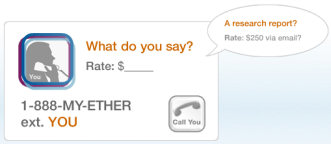
This is the motto of ether, a company backed by the same investors as Ebay and Skype. All you have to do is setup a free Ether Phone Number, set a rate and when people call, you get paid. The rate you set is up to you. You can charge per minute or per call.


There are also other web sites out there that help trainers/advisors monetize their experience. Two of them are BitWine and TWL. Although not voice oriented like ether, these sites offer good tools to their subscribers.

Wednesday, January 31, 2007

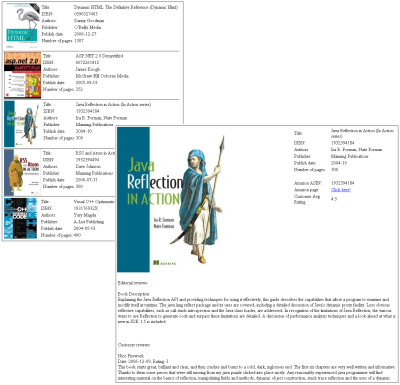
Catalog your books collection using Amazon.com

If you have lots of books on your bookshelf that you’d like to catalog, then the following tool may come handy. It is a free tool with C# source code available on request (actually, the source code may make the subject of an article or another post in the near future).

The catalog is generated in HTML format using information provided by Amazon WS. In general the information for each book will contain a picture of its cover, editor review and Amazon.com customer reviews.


For a limited time (1 week) you can download it from here. If happened to land on this page at a later time, and found the link expired, drop me a comment and I’ll send you the tool.

Tuesday, January 30, 2007

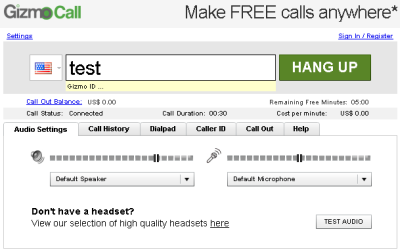
GizmoCall

The guys at GizmoProject launched recently a new service. Named GizmoCall, the new service allows you to make phone calls directly from your web browser. It is not a web activate phone service like Jajah – but a pure SIP softphone implementation with a Flash interface.

GizmoCall

Monday, January 29, 2007

Free calls to US

After Skype terminated last year its promotion of free calls to US, a lot of small companies started to offer free calls to US and other popular destinations. While reliability cannot yet be verified with all of these companies, is still worth using them for occasional or test purpose calls.


Free calls to US:

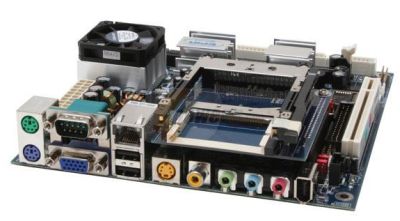
Build your own appliance using PC technology

The big advantages of designing embedded products around PC technology is the simple development and quick time to market mostly due to reusing existing components such as: operating systems (Linux or Windows), drivers, development toolchains (GCC, .NET Framework, Java, etc) or even complete applications.

Encouraged by the success of Mini-ITX and Nano-ITX series, VIA announce recently pico-ITX. The new pico-ITX form-factor will reportedly measure 3.9 x 2.8 inches (10 x 7.2 cm) -- exactly half the surface area of Via's already small 4.7 x 4.7-inch (12 x 12cm) Nano-ITX standard, and considerably smaller than the original 6.7-inch square (17 x 17cm) mini-ITX standard.


If you are already using your PC only for a few dedicated tasks (VoIP, Media Center, etc) consider turning it into an appliance using one of the above motherboards. The tremendous benefits will include: low power consumption, no moving parts (most of these motherboards/processors can be used with a passive heat-sink and the HDD can be replaced with a flash memory), cool appearance … not to mention the personal satisfaction. A good place to start with such project is mini-itx.com

Thursday, January 25, 2007

Linux for gadgets

If happens to be a Linux and/or embedded development supporter, then you probably know already LinuxDevices.com. If now, then stop reading now this post and make that site a visit. Besides news and forums you’ll also find nice articles, like the following:

Although embedding Windows may not be for you as fun as embedding Linux, the site WindowsForDevices.com is still a good web destination.

Skype without a PC

Do you like Skype (better than SIP?!) but you don’t like to be near the computer when making phone calls? There is good news for you: at least a few companies have launched Skype devices that don’t require a PC. All you need is a broadband connection and one of these devices: DUALPhone 3088, Webtalker 5000, SMC WSKP100 or Netgear SPH101.

Skype without a PC

Note: Alternatively you can use Skype for Mobile and a compatible PocketPC PDA.

Wednesday, January 24, 2007

SlingBox vs Hava

Remember SlingBox and Hava? Since last post, both producers extended their streaming boxes family with new models with integrated tuners and HD support. If you intend to buy one of these products, the recommendation is to check yourself the specifications and then read tons of reviews. Anyway, for a quick compare you may take a look at the following table:


* This table was published by snappymultimedia, and so may contain subjective information.

Note: According to user reviews it appears that (at least with current firmwares) Slingbox is better suited for remote connections while Hava for local connections. On remote connections Hava seems to drop frames while on the LAN has exceptional quality, much greater than Slingbox.

Tuesday, January 02, 2007

Mobile to VoIP bridge

Finally a flexible and affordable mobile to VoIP (Skype and SIP) bridge service was launched at the beginning of this year. As opposed to other similar services, this is the first one focused on simplicity and customization.

Although it is marketed as a mobile to VoIP bridge service, you can use it with almost any classical phone. All you have to do is dial a local access number (or a toll-free number), and after the system recognize your CallerId, type your abroad number.

The interesting part is that you choose the rates by registering your preferred VoIP providers with this service. All your calls will be routed through one of your registered providers according to a dial plan you define.

This is the registration page for you providers. For maximum convenience, you can register more than one account with the same provider. Note that the service doesn’t actually register with SIP proxies because most people have also ATAs at home that use the same service.

Provider list

The following screen is the one where you define you dialing plan. You basically need to specify just a prefix for each account that you want to use. While on the road, call a local PSTN access number, then your destination number beginning with the prefix for the appropriate account.

Dial plans

For even a simpler way to call abroad family and friends, the service offer the ability to define personal local numbers for those contacts. Just add these numbers to your phone’s address book and you are ready to call. For the other contacts (that you don’t call that often) just dial a generic local PSTN access number.

Personal local numbers

At this moment the service offers local PSTN access numbers in 40 countries including United States (numbers in 48 states), most western and eastern European countries, Israel and a few others from Asia and Africa.

While in beta the service will be FREE for all users. After that, the service owner announced that will introduce several plans: a free one targeting individuals (ad-supported) and some commercial plans targeting mobile corporate users. The free accounts will not have the possibility to define personal local access numbers. The users of free accounts will have to dial a generic local PSTN access number or the toll free number.

For more information about this service please drop me a comment.

Saturday, December 30, 2006

Finarea/Betamax VoIP

Finarea S.A. is a Swiss company that operates discount phone services under different brands. Even if you are in VoIP, you probably never heard Finarea until now, but brands such as voipbuster, voipstunt are probably very well known especially if you are after deals to international calls.

Betamax GmbH & Co KG is a German company that according to their press release, in December 2005, they took over all of the VoIP services previously run by Finarea SA. A few more VoIP services were added after that to the group.

Group companies:

http://www.freecall.com/
http://www.internetcalls.com/
http://www.lowratevoip.com/
http://www.netappel.fr/
http://www.poivy.com/
http://www.sipdiscount.com/
http://www.sparvoip.de/
http://www.voipbuster.com/
http://www.voipcheap.co.uk/
http://www.voipcheap.com/
http://www.voipdiscount.com/
http://www.voipstunt.com/
http://www.webcalldirect.com/
http://www.voicetrading.com/

The rates and promotions are always different between these providers. The following table lists the rates with Romania as extracted by the guy at http://backsla.sh/betamax.

Rates with Romania

Other source of non-official but good information about these companies can be found at Wolf’s pages.

Tuesday, December 26, 2006

Call Skype contacts from mobile/any phone

If you ever wanted to use your mobile phone to call Skype contacts or make cheap SkypeOut phone calls, then you should look no further than VOXLIB.

Its usage is plain and simple:
- install Vox for Skype on your home computer;
- leave the computer and Skype on;
- while on the road, from your mobile or any phone, dial your SkypeIn number;
- the system recognize your CallerId and let’s you call any Skype contact you have in the list or make a SkypeOut phone call.

The ones without SkypeIn can use SMS. See VOXLIB website for more information.

Wednesday, December 13, 2006

Cheap calling plan from Skype

Pay until the end of the year $55 and you can have:
  • 1 year of unlimited nation-wide phone calls
  • A new phone number
  • Voice Mail

All this is possible due to a new disruptive calling plan announced recently by Skype. For only $14.95 (or $29.95 after January 31st 2007), Skype gives you a full year of unlimited calls to anyone, on any phone, within the US and Canada.

Add a regular phone number and Voice Mail via SkypeIn service and for $55 you’ll have a very cheap calling plan for the next year.

To complete the experience you need to purchase a hardware Skype device, preferable one that doesn’t require a computer (see DUALphone 3088).

And if you decide to visit Skype to check this great offer directly at the source, take a few minutes to download also the latest Skype 3.0.

IE7 annoyances and how to fix them

All fixes involve registry changes. If IE is opened, close it before doing anything. Then start your registry editor (Start -> Run, type regedit in the run field and press OK).


Put menu bar at the top

Browse to HKEY_CURRENT_USER\Software\Microsoft\InternetExplorer\
Toolbar\WebBrowser

Create a new DWORD Value, and name it "ITBar7Position". Double click that new value, and assign it with a decimal value of 1

Restart IE7


Remove search bar

Create the following key:

[HKEY_LOCAL_MACHINE\SOFTWARE\Policies\Microsoft\Internet Explorer\Infodelivery\Restrictions]

Create a new DWORD Value, and name it " NoSearchBox". Double click that new value, and assign it with a decimal value of 1

Restart IE7

Saturday, December 02, 2006

Cell phone providers in US and Romania

* Only the most popular providers are listed.

Use the following links to reach listed companies websites:

US: Cingular, T-Mobile, TracFone, Verizon Wireless, Sprint Nextel, Alltel, Virgin Mobile
Romania: Vodafone, Orange, Cosmote, Zapp Mobile

Although GSM is standard and well established in lots of countries, you may have surprises when you travel abroad with a phone that is not multi band. Read more about international phones in CNET’s Quick guide to World roaming.

If you need a quick introduction to 3G, it worth checking: CNET’s Quick guide to 3G.

Friday, December 01, 2006

The pixels are coming back

...and this time it's YOUR chance to get rich.

At least this is what Alex Tew, the kid that made $1.000.000 by selling pixels, is saying. Last time he sold the pixels of a 1000x1000 image at The Million Dollar Homepage with $1 each (a minimum square of 10x10 pixels per purchase required).

Now he is trying to do the same thing again but this time at a rate of $2/pixel on a new site called Pixelotto. The gotcha is that he will offer via a lottery half of the collected money (meaning $1.000.000) to a lucky guy who bought some pixels.

Email for elderly people

... or how to receive emails on a printer without a computer or internet connection.

This is what Presto service is offering. To benefit from this service you need to purchase a special HP inkjet printer. This dials into the Presto network and downloads and prints messages that have been received. To fight spam (which is even worse when comes on paper ;-) ) you can define the Presto friends list so to only receive messages from trusted sources.

One number rings all phones

Do you want an unlimited voice mail box with classical answering machines advantages such as real time listening on voice messages?
Do you want a single phone number that people can use to reach you no matter if you are at work, at home or on the road?
Do you want privacy by blocking unwanted callers?

If you answer yes to at least one of the above questions then go to http://www.grandcentral.com and find more info. At this moment the service being still in beta allows potential customers preview premium features for free. After you finish with this one, don’t forget to check also http://www.iotum.com

Best phone rates to Romania as of December 1st, 2006

If VoIP doesn’t scare you, chances are pretty good to obtain very advantageous rates to call Romania.

Cheap providers to call Romania

Update: A colleague presented me today another service for making cheap calls to Romania. It is called focusTALK and was introduced by focustel in October, 2006. Their rate is 4.2 euro cents / minute with national landline network.

Additional charges or discounts may be available for each provider. Make sure you check their offer carefully. Above displayed rates assumes you are calling on a Romtelecom landline somewhere in the country.

For more information see my previous related posts: Cheap calls to Romania (Suna ieftin in Romania) and VoIP rates with Romania as of April 01, 2006.

While talking about Romania, it worth mentioning a free Fax by Email service available through: http://www.fax2mail.ro/

Monday, November 20, 2006

.NET Framework 3.0 has been released

The .NET Framework 3.0 has officially been released! You can download the .NET Framework 3.0 components here.

For those who already have the .NET Framework 2.0 installed, this .NET Framework 3.0 redistributable package installs only the new Windows Vista components: Windows Presentation Foundation (WPF), Windows Communication Foundation (WCF), Windows Workflow Foundation (WF), and Windows CardSpace (WCS, formerly “InfoCard”).

After you install it, make sure you check couple of XAML demo applications from:

mobiform

Avalon Clock
Paint Factory Demo

Karen Corby

Woodgrove XBAP
FontPlayer XBAP

I’m sure that both XUL and MXML fans will have something to comment about XAML and XBAPs. Maybe AJAX fans too.

Sunday, November 19, 2006

VHDs - Microsoft's virtual appliances

Following VMWare’s model of virtual appliances, Microsoft started to offer also, as free downloads, preinstalled virtual machines under the name of pre-configured Virtual Hard Disks (VHD).

Although at this moment the offer is limited and includes mostly Microsoft products (Windows Server 2003 R2, Exchange Server 2007, SQL Server 2005, etc), it is expected to see more in the near future due to VHD Test Drive Program that address to Microsoft partners willing to distribute there applications in a VHD container.

Tuesday, November 14, 2006

VoIP Phone Systems for Windows

While most free or open source SIP servers are Linux based (see Asterisk), it’s always nice too see solutions for other platforms as well. A few months ago I evaluated OnDO SIP Server a SIP Registrar and Proxy Server for Windows. This post will present another two, even more interesting products:

Yate http://yate.null.ro/
This VoIP server/client, developed by a Romanian company is continuing to receive good reviews from all over the place. Written in C++, with support for popular scripting languages such as PHP or Python, the software is portable between Linux and Windows.

3CX Phone System http://www.3cx.com/
Although not open-source, 3CX Ltd offers a free edition, supported by forums of their Windows Based PBX system.

Thursday, November 09, 2006

No-hassle free remote access for home users

Implementing remote access strategies is a common practice in corporate world. While these companies have budgets for buying special hardware or software and hiring qualified IT personnel, the same thing is not true for home users.

This post presents 2 simple and free methods that home users can successfully implement in order to make their PC or home network securely available from any point on the Internet. Users may have zero knowledge about routers, NAT, port forwarding and still enjoy the benefits of remotely access the home PC while visiting a friend, being at school or traveling far from home.

LogMeIn Free
This solution offers the easiest remote access for home and personal use. LogMeIn lets you access your Windows PC from anywhere in the world. All you need is a computer connected to the Internet and a web browser or any web-enabled Pocket PC device.


Hamachi + UltraVNC
While not as straightforward as the solution presented above, this combination of free software has its own advantages. Not only that allows you to easily transfer files between the local and target computer but lets you also play almost any LAN game you may have. You can even try your old IPX games with a friend over internet.

Wednesday, November 08, 2006

Cool VNC Derivatives

RealVNC
http://www.realvnc.com/

RealVNC is produced by a UK company founded by the team that designed and implemented the original VNC software. Besides the free version the company offer also 2 commercial editions packed with extra features plus a KVM-over-IP based on VNC protocol.


Ultr@VNC
http://ultravnc.sourceforge.net/

This free software, based on the same VNC protocol, brings interesting features such file transfer and an improved video driver for free. From the same site you can download also several interesting add-ons such as: NAT-to-NAT (allowes for connections between UltraVNC viewer and server behind NAT routers without any router modification) and SingleClick (customizable mini UltraVNC server for help desk support).


CrossLoop
http://www.crossloop.com/

This is more about P2P than VNC. In fact the application allows you to establish a P2P connection between 2 firewalled computers. On top of this connection the software runs a VNC derivative (TightVNC). For supporting sessions, the software seems like a perfect alternative to expensive commercial solutions.

Thursday, October 12, 2006

LogMeIn and hamachi

LogMeIn and hamachi: two of my favorite remote access application just joined forces. Actually LogMeIn has acquired Hamachi creator, Applied Networking.

Long time before this acquisition I evaluated both applications in my search for a simple, low cost and yet effective remote access application. The decision was hard to take but in the end I decided to go with LogMeIn. Now I’m using it myself and most of my work colleagues as a way to access corporate computer while home or on the go.

Because is always good to keep an eye open I decided to revisit the hamachi site. I was very surprised to see the other product logo on hamachi site. I briefly read the acquisition note and I just start thinking again of how to use hamachi. This time I’ll not try to use it as an RDP replacement but rather like a complementary solution to LogMeIn. Together these products may offer a perfect setup for lots of scenarios such as:
  • Virtual Office
  • Collaboration
  • Work from Home

Wednesday, October 11, 2006

Backup your personal data to a portable USB drive

You just got a brand new portable USB Drive (or USB Memory Stick) and your intention is to use it to backup important data to that external drive. You have a couple of solutions at your hand:

- copy files by hand;
- using the software that comes with the drive (if any);
- using a well known backup program with lots of features: full backup, incremental backup, etc.
- using a less than common shareware backup program that does only file synchronization.
- using Microsoft Briefcase (included in your Windows OS).

Because this article is dedicated mostly to home users one of the major feature requested by this category of users is the backup software to not use any kind of proprietary archive format. A proprietary archive format makes difficult data access relaying on using the same software to browse the archive and restore from archive.

Proprietary archives are the preferred storage format for majority of commercial dedicated backup software because of the advanced features exposed by this kind of software: incremental backups, spanned archives, etc. While professional IT administrators appreciate these features, for the regular home user these are too much.

A home user just wants a second copy on his personal data to sit on a USB drive. A quick access and restore from that data is more appreciated then other advanced features. The above list just gets shorter:

Copy files by hand

Power users (who have lots of available time) prefer this method. Basically they cannot trust their precious data synchronization to any software. They’ll usually copy changed files on the external hard drive each time they have new data (eg. Downloading photos from a digital camera) or from time to time using a regular or not so regular schedule.

Using a simple backup software

Several free, open-source or shareware products can be downloaded from internet to assist in creating the second copy of your data on the external hard drive. A relatively good one is Second Copy from http://www.centered.com

Using Microsoft Briefcase

This is one of those utilities that comes with Windows but not known by majority of people. Designed initially to take documents on the road, work on them and then synchronized back with the main computer when home, the tool can be very well used for keeping a second copy of your data on the external hard drive.

A Briefcase is just a folder recognized by this application. You can create Briefcases in any place you want by selecting File -> New -> Briefcase from Windows Explorer menu (or any contextual menu). To quickly put a Briefcase on your desktop type the following command in the Run box: syncapp.

After you created your briefcase on the USB hard drive, drag inside all the folders and files you want to backup. Being just a folder, the data is available inside the Briefcase using Explorer. Just a note here: use Windows Explorer and not any other tool to put data inside the Briefcase. Using a 3rd party tool such as Total Commander to copy data inside briefcase will make the files orphan and so will not be monitored for update by Microsoft Briefcase.

Each time you change something on your hard drive in one of the folders that you dragged in the Briefcase, is enough to right click the Briefcase and select Update all. The second copy will be automatically synchronized with your PC.